I’ve been building Oro for a while. It’s time to show it.
A production environment for AI image editing, shaped around the way I actually work. Most of it runs offline on my own machine. The generative engines are there when I need them, and quiet when I don’t. It has already replaced several tools in my client work, and it is still in beta.
Oro
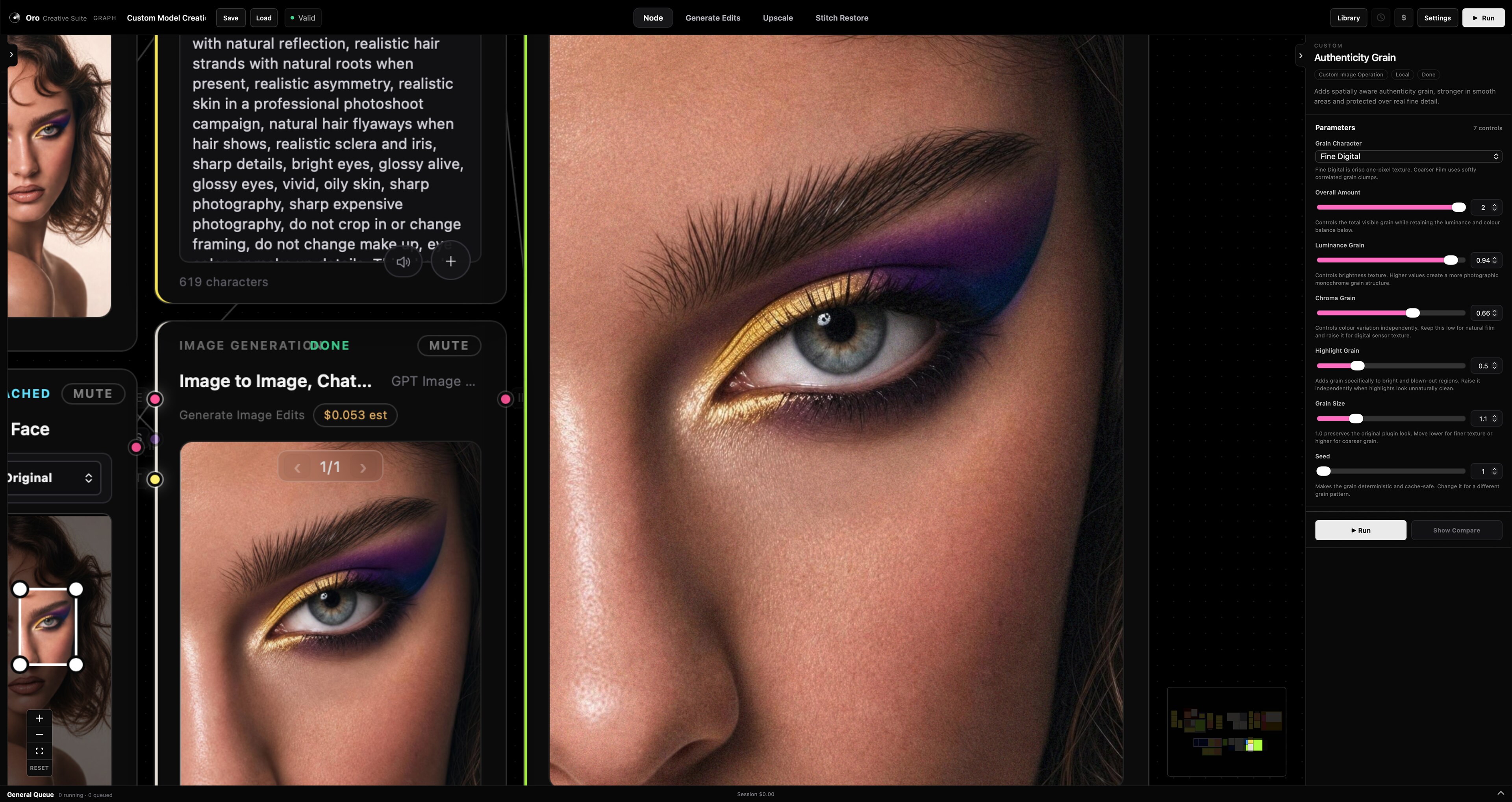
Oro is a tool I envisioned at with a Pro-first approach. All of the tools I can think of are added to it, daily. To their highest quality, with simplicity and easy-to-use in mind. They have just what is needed, in ways you might not expect. It’s fully alive. It’s advanced, but it does not get boring. It is beautiful, fast, flexible and ready faster than you could ever expect.
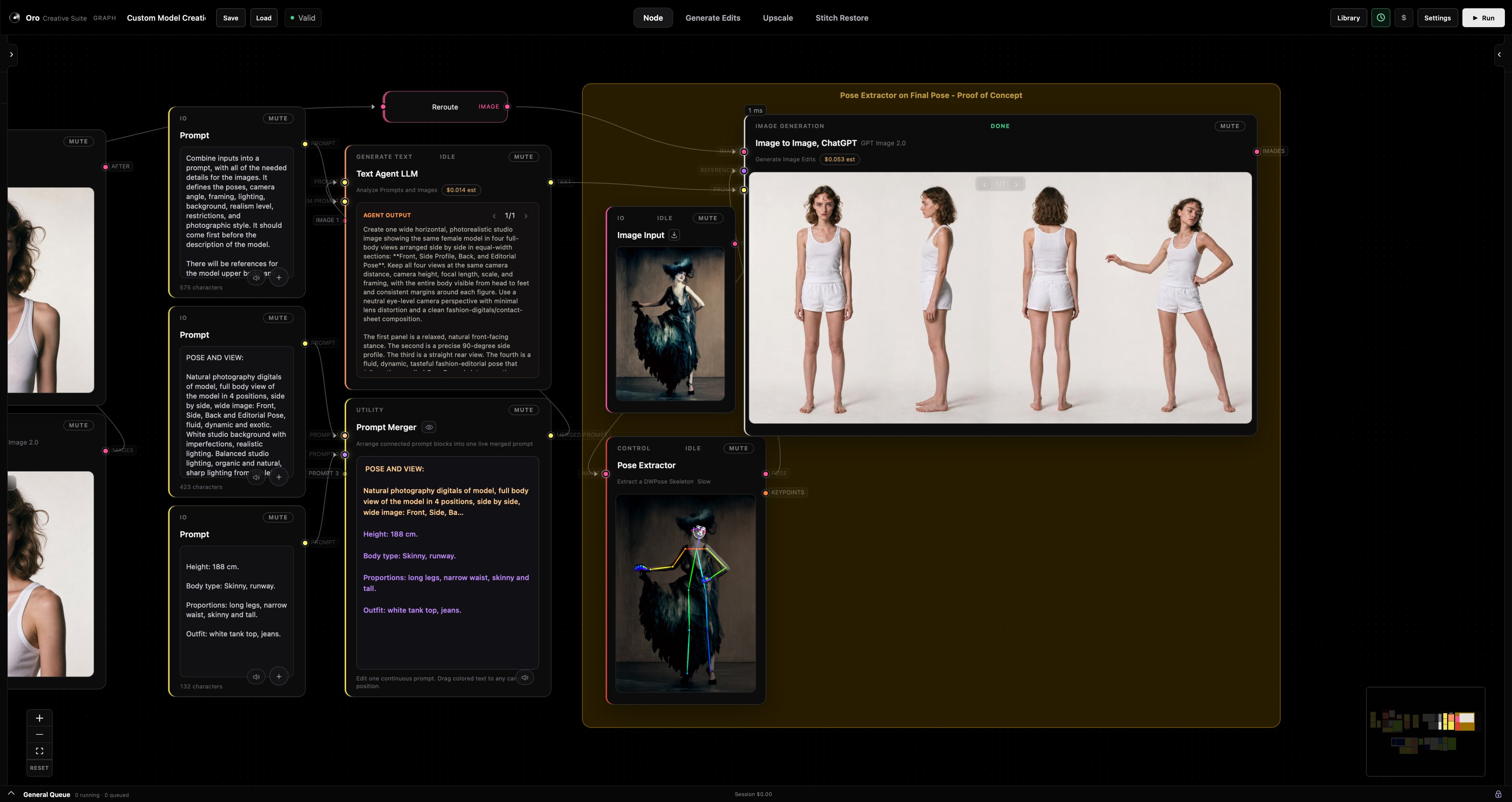
Most of what you can do costs nothing and never leaves the machine. Depth extraction accurate enough to use in advanced generations and editing. Pose detection that hands back an editable skeleton, so you can move a limb and generate from the result from its reference instead of describing it in a sentence. Subject and transparency extraction that cut a figure out cleanly enough, fast. And a compare workflow that stays live inside every generation, so you don’t have to think twice before shipping an approval.
It has full workspaces for deeply technical jobs, and a node canvas that lets you expand and reiterate with an ease that makes work even more fun. Mistakes are flagged as they happen, and Alerts take you right into what needs fixing. Change one setting and only what depends on it recomputes, feeding into whatever is next. Cost is flagged beyond what you manually set up, so there are no surprises. And every single image has it’s full workflow stored in it. Automatically.
Runs on one Mac. Most of it offline.
48 nodes, 10 of them plugins,
Local engines, activated instantly on demand,
With endless possibilities.
SPEED
The whole suite opens in 3.0 seconds.
Not a splash screen, not a loading bar.
Everything is ready to go. Fast.
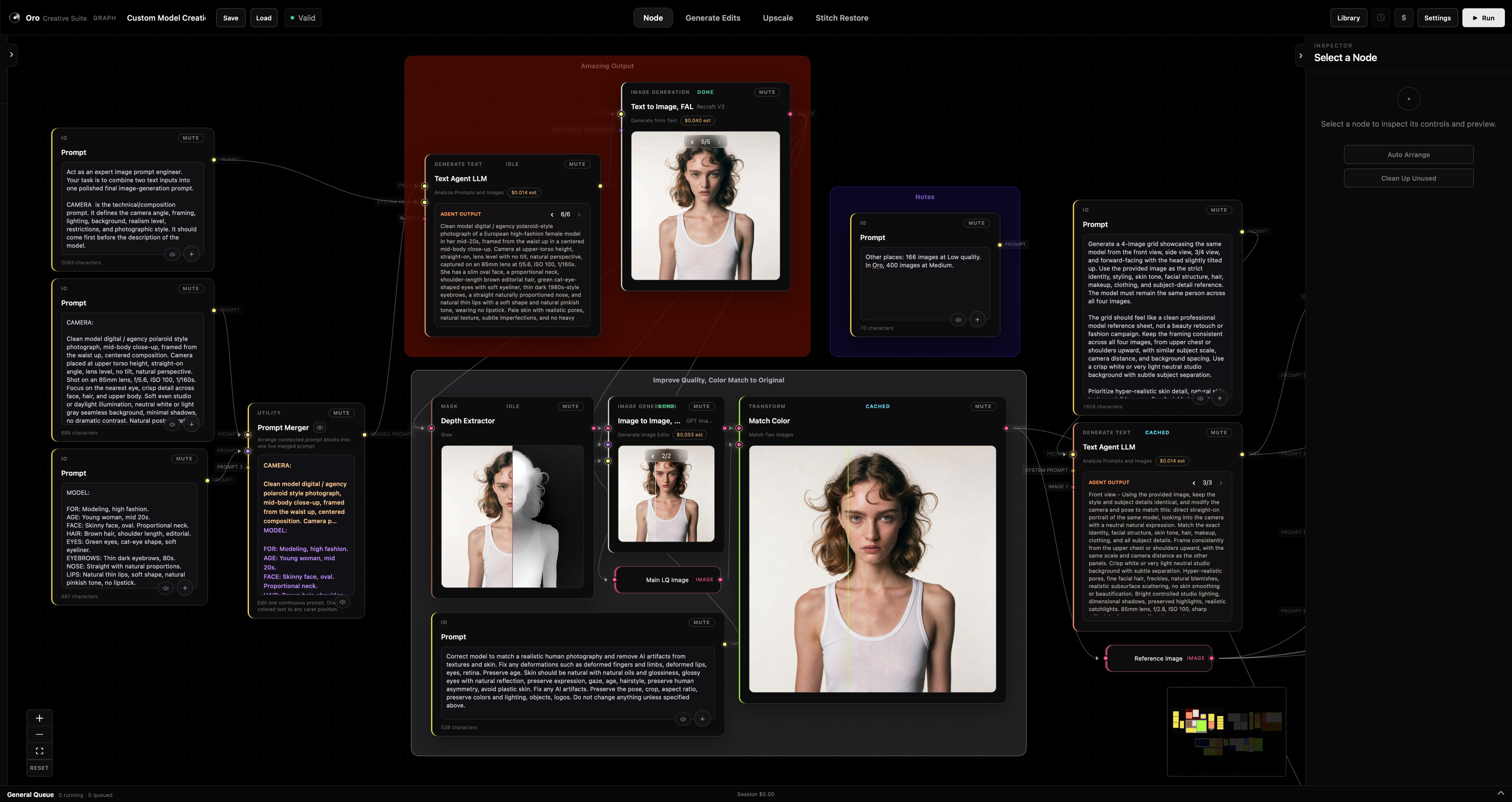
Almost everything runs on my machine, and costs nothing
This is the part I care about most. Anything I run dozens of times an hour had to be free, offline and instant, and good enough to use on paid client work rather than good enough for a demo. Only four things in Oro ever reach the internet.
Offline
Production quality, no account, no latency.
Zero cost, alwaysDepth extraction
Accurate enough to composite against, not just to look at. Multiple model sizes, and a resolution control for when the edge quality matters more than the second it takes.
Pose, with an editable skeleton
Detection returns 133 points including individual finger joints. Drag a joint, change the pose, generate from the result. Coordinates are normalised, so a pose captured once stays correct at any size.
Subject extraction
Cut a figure from its background cleanly, with a painted hint when the scene is ambiguous, and a refinement pass for the edges that decide whether a cutout is usable.
Transparency extraction
Turn luminance, depth or a mask into a real alpha channel, so the result composites rather than sits on top of what’s underneath.
Auto stitching
Finds the matching region between an edited crop and the full frame, then places it back with masking, colour match and warping worked out. Manual anchor pairs when the scene fights it.
Always-on compare
A live before and after inside every generation, not a separate view you have to go and find. The only useful question about an edit is what it changed.
Prompt-driven masking
Describe the region in words and get a mask back. Sectional selection for the rest, all running against a local model with nothing sent anywhere.
Grain and authenticity
Controlled noise with real handles over size, chroma and highlight response, for when an image needs to stop reading as generated.
Grid removal
A frequency-domain notch filter that carves out the faint repeating grid some upscalers leave behind. Measured at a 99.8 percent reduction on the targeted frequency.
Colour matching
Match one image to another automatically, so an edited region rejoins its source without a manual grade.
Local generation
SDXL on the machine, including pose-conditioned generation through ControlNet, sharing one resident model rather than loading a second copy.
Upscaling
Several local models, chosen per image rather than applied by default, with tiling for the frames that would otherwise not fit.
Online
Four things, and only when I ask.
Priced before it runsImage to Image
Reference-guided editing across every provider, each with its own full parameter set rather than a shared lowest common denominator.
Text to Image
Generation from a prompt, with the same model families, sizes and quality controls exposed properly.
Advanced Upscaler
The hosted upscalers, for the frames where a local model is not enough and the detail has to be invented well.
Video
Soon. The executor and cache are already shared with a sibling application built the same way.
Nothing paid runs by surprise. Every run shows an exact per-node estimate before it starts, sits under a budget ceiling the graph cannot exceed, and reuses a cached result for free. A duplicated node never inherits a paid output it did not earn. The confirmation dialog can be switched off when I am moving fast; the ceiling cannot.
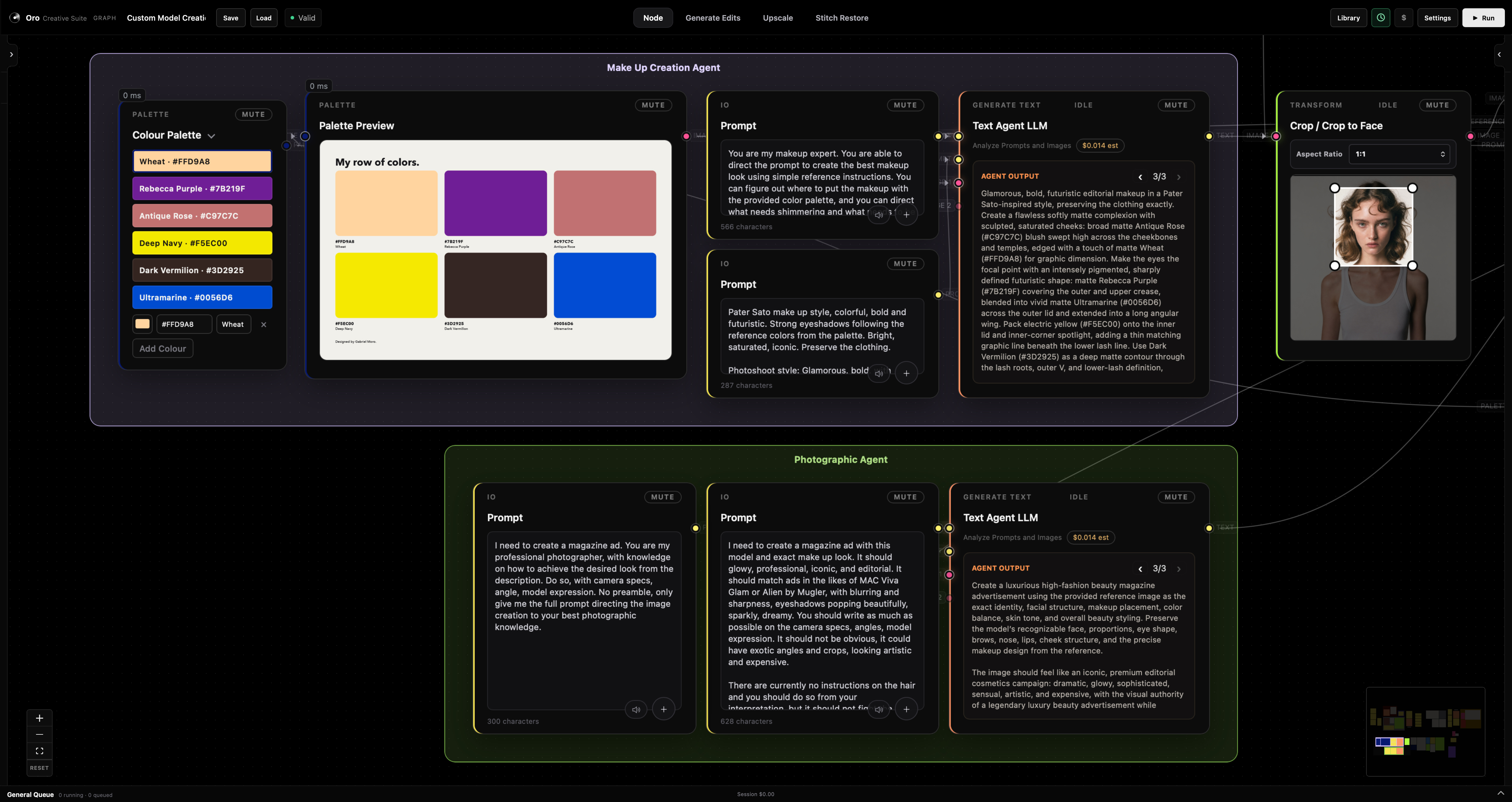
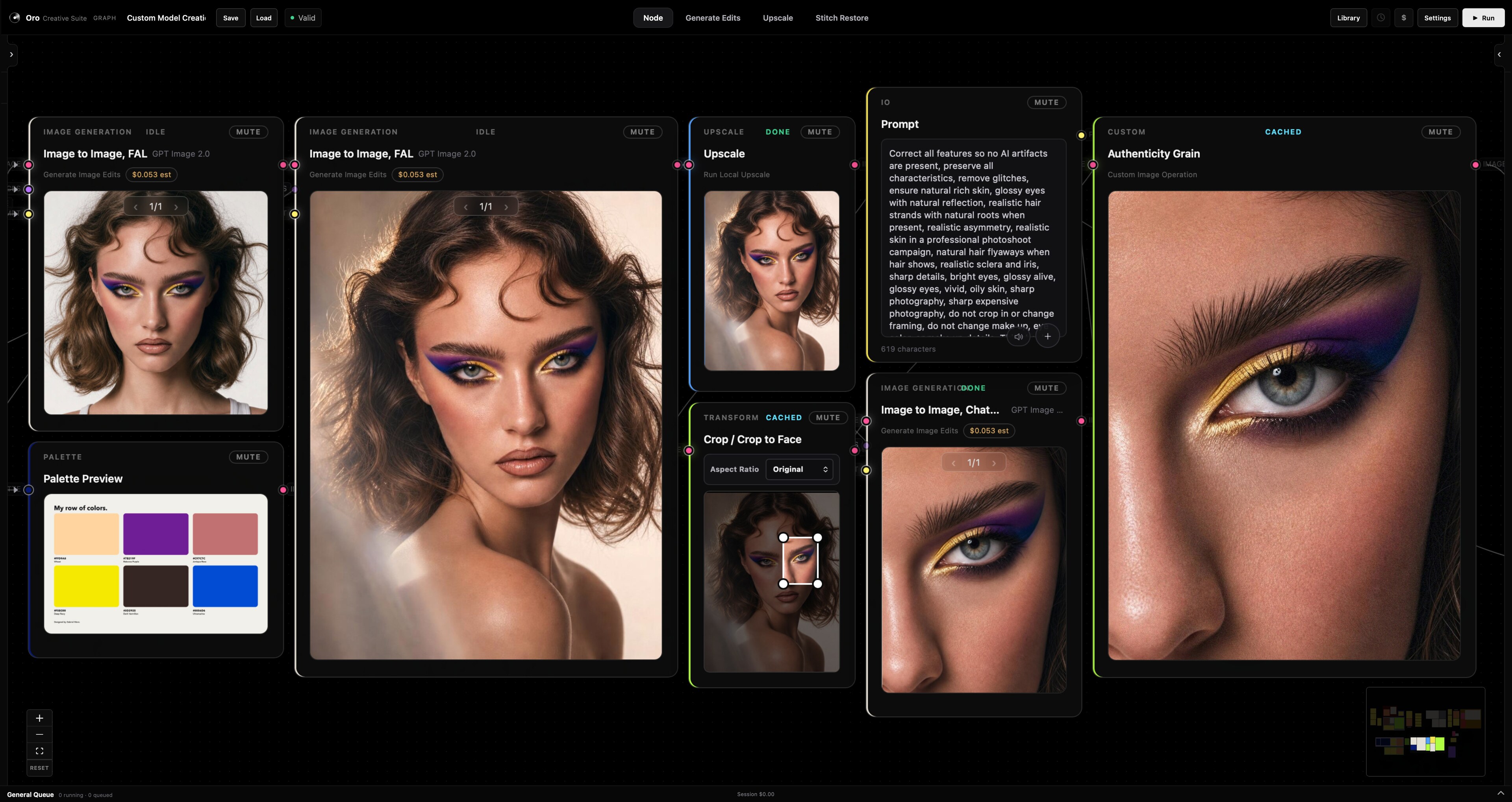
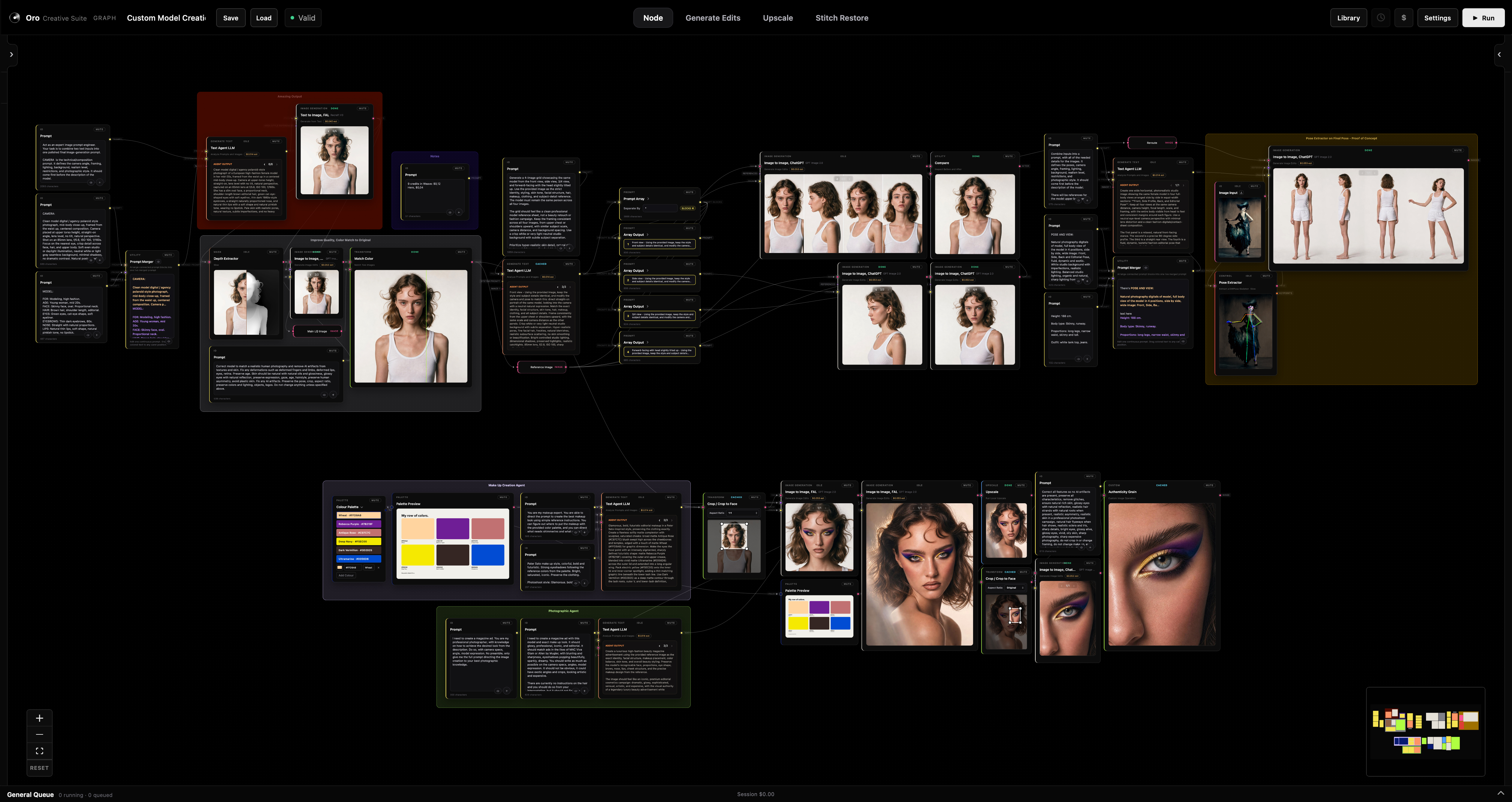
Most of what you can do costs nothing and never leaves the machine.
Development Record
Forty-two passes so far, each one a scoped brief, a reviewed diff, and a changelog entry stating what shipped and what stayed unverified. A selection, newest first.
Visual groups with editable names, live colour and opacity, and bounds that follow their members as those members move and resize. Ctrl or Cmd+G to group, Option+G to pull a node back out. Deleting a group keeps every node inside it.
Groups persist into saved workflows and are covered by undo and redo. They are deliberately never written into the node list the server validates, because a group is a frame around work, not a step in it.
Remaps image luminance or a mask through draggable RGBA stops, with Linear, Ease, Constant, Cardinal and B-Spline interpolation across RGB, HSV or HSL, and Blender-style hue directions. Source alpha is preserved exactly.
It also forced something larger: a reusable inspector-control registry, so a plugin can be handed a real gradient editor with stop dragging and an app-wide eyedropper without the app ever executing plugin JavaScript. ColorRamp was its first tenant. The Pose Editor was its second.
Depth Anything V2 running locally on the GPU, loaded lazily and downloaded once. Small, base and large weights, with a resolution control for when edge quality matters more than the second it costs.
Free, offline, and accurate enough to composite against rather than merely look at, which is the whole reason it is worth having on the machine instead of behind an API.
Detection returns 133 whole-body points including individual finger joints, rather than the eighteen most pose tools settle for. Coordinates are stored normalised, so a pose captured once stays correct at any output size.
The editor draws that skeleton on a canvas and lets me drag a joint to change it. ControlNet generation then runs against the edited pose, borrowing the already-resident local model instead of loading a second copy.
Then I measured it. Roughly 3.8 seconds per step at full resolution, close to two minutes for one image. That number is what turns a feature into an informed choice about when to reach for it.
Every generative node keeps its own results. Arrow through them, pick the one that works, and it becomes the active output downstream, replayed locally without a second paid request.
History stays out of the saved workflow on purpose. A workflow is a recipe, not a scrapbook. And a duplicated node starts clean rather than inheriting a paid result it never earned.
Some upscalers leave a faint repeating grid behind. This carves the offending frequency out of the image’s own spectrum, with manual period targeting and optional diagonal checkerboard removal, across 8-bit and 16-bit with alpha and ICC preserved.
While generalising it past one fixed spacing, testing turned up a real gap: full cancellation only happened at the single period it was first tuned for, and everything else silently landed at half strength. After the fix, the targeted frequency fell by 99.8 percent against a real photograph, with error down 84 percent. Shipped as one plugin file, zero core edits.
Cuts a figure from its background using pinned BiRefNet Lite salient-object segmentation. Optional painting only selects which predicted component I meant, and never leaks into the output itself.
This replaced an earlier whole-image GrabCut with optional SAM refinement. The simpler pinned model was chosen after checking whether the heavier one actually earned its size. It did not.
A freeform writing field where every connected prompt appears as a coloured block I can drag to any caret position inside my own text. The merged result is what goes downstream.
Getting the caret behaviour right took three attempts. Editing text around inline non-editable blocks is where browsers disagree most, and the fix that finally held came from extracting the logic into a testable module rather than patching the editor in place.
Background work split into a general lane and a serial accelerator lane. Independent CPU and provider work keeps moving while a local GPU model runs, and GPU-heavy inference stays serialised so it never fights itself for memory.
Queued work can be cancelled with a guarantee it will not start afterwards, and running work stops at the next safe boundary rather than mid-write.
New tools land most days, and I’ll start showing them one at a time. This is only the beginning.
hello@gabrielmoro.meThis page is being updated.
More content is on the way.
Come back soon for the full documentation.